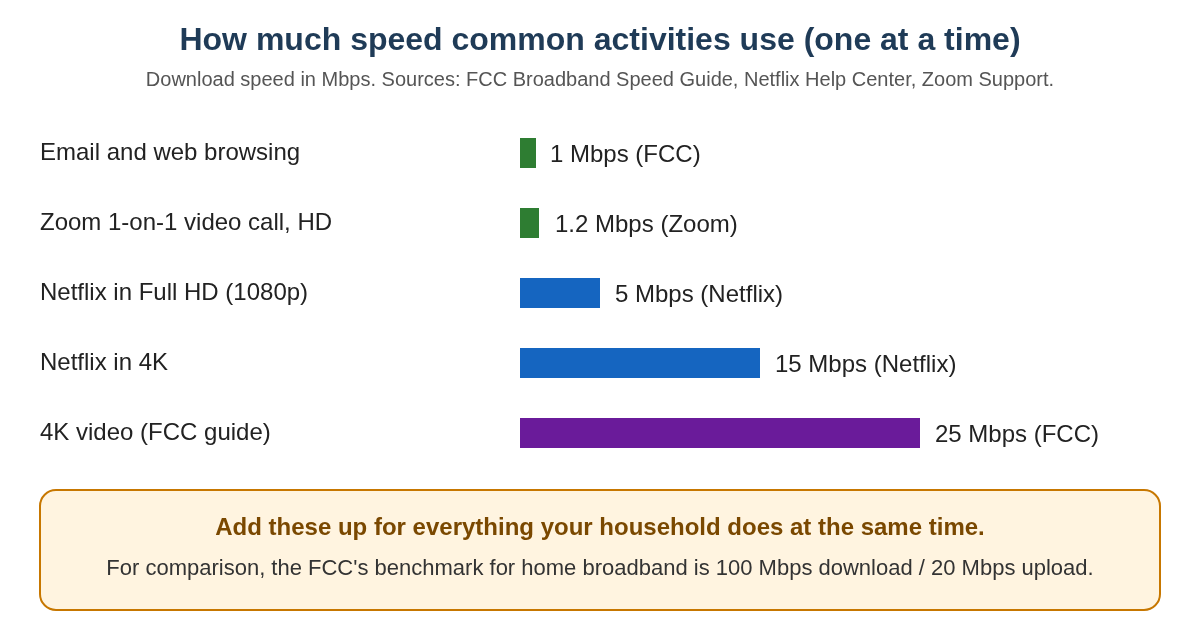

For most seniors, an internet speed of 50–100 Mbps (megabits per second) is enough for email, browsing, video calls, and streaming TV on one or two devices. If you live with others who stream a lot, or you want the smoothest video calls and TV, 200 Mbps or higher can feel more comfortable. Very high speeds (500–1000 Mbps) usually cost more than most seniors need and do not make basic tasks noticeably faster. The right choice depends more on how many people use your internet and what you do online than on the biggest number a company advertises.

Table of Contents

Quick Comparison

  • Best for simplicity: 25–50 Mbps plan for one senior using one or two devices
  • Best for multiple users: 100–200 Mbps plan for couples or small households
  • Best for heavy streaming: 200+ Mbps plan if several people watch HD/4K TV at once
  • Best value: The lowest plan that still streams TV smoothly without frequent pauses
  • Biggest limitation of slower plans: Video can freeze or blur when several devices are active
  • Biggest limitation of faster plans: You may pay for speed you never notice or use


What Internet Speed Really Means

Internet speed is simply how quickly information moves between your home and the internet. It is usually measured in “Mbps,” which stands for megabits per second. You can think of it like water pipes: a bigger pipe (higher Mbps) can carry more water at once, which matters most when several taps are on at the same time.

For a single senior who checks email, reads news, and has an occasional video call, a smaller “pipe” is usually enough. For example, 25–50 Mbps can handle email, browsing, and one video stream without much trouble. When you add more people or more devices, such as a smart TV, tablet, and phone all using the internet at once, a larger speed like 100–200 Mbps helps keep things smooth.

A common misunderstanding is that higher speed always makes everything feel faster. In reality, many websites and apps already load quickly at 50 Mbps, so jumping to 500 Mbps may not feel different for simple tasks. Where higher speed helps most is when several people are streaming TV, downloading large files, or doing video calls at the same time.

Difficulty level: Easy. You do not need to understand the technical details; you mainly need to match your speed to how many people and devices use your internet. If you are unsure, you can test your internet speed in a few minutes and compare it to how your internet feels day to day.

Common Speed Levels for Seniors

Most internet companies offer several speed levels. The names may differ, but the common choices are usually around 25 Mbps, 50 Mbps, 100 Mbps, 200 Mbps, and sometimes much higher. It can be confusing when salespeople push the biggest number, so it helps to know what each level is generally good for.

Speeds around 25–50 Mbps are usually enough for one person who checks email, browses the web, watches one streaming video at a time, and makes video calls with family. Speeds around 100–200 Mbps are better for couples or small households where two or three people might stream TV, use tablets, and have video calls at the same time. Speeds above 200 Mbps are mainly helpful if you have several people in the home or many devices always connected.

A common misunderstanding is that you must match the speed your children or grandchildren use. Younger families often have many devices and heavy use, so they may truly need higher speeds. Many seniors can be comfortable with a lower, less expensive plan. Difficulty level: Easy. Once you know how many people and devices use your internet, choosing a speed level becomes much simpler.

Ease of Use

Internet speed itself does not change how you use your computer, tablet, or TV. You still click the same buttons and open the same apps. What changes is how quickly things load and how often you see spinning circles or pauses. For many seniors, a moderate speed (50–100 Mbps) feels easier to live with because pages and videos usually load without long waits.

With a slower plan, such as 10–25 Mbps, basic tasks can still work, but you may notice more delays. For example, a senior living alone might be fine reading news and checking email, but when they start a video call with grandchildren, the picture may freeze or become blurry if someone else in the home starts streaming TV. This can feel like a “computer problem,” even though the real issue is limited speed.

With a faster plan, such as 100–200 Mbps, everyday use often feels smoother, especially if more than one device is active. A couple might watch streaming TV in the living room while one partner checks email on a tablet without noticing slowdowns. The limitation is that if your Wi‑Fi signal is weak or your equipment is old, extra speed from the company may not fix the problem. Many people misunderstand this and upgrade speed when they really need better Wi‑Fi coverage or a simple router restart.

Difficulty level: Easy. Once your internet is set up, you use your devices the same way regardless of speed. If things feel slow, it usually takes 10–20 minutes to check your speed and restart your router using a guide like How to Restart a Router (Beginners Guide).

Learning Curve

The learning curve for internet speed is mostly about understanding what you are paying for and when to change it. You do not need to learn new skills to use a 200 Mbps plan instead of a 50 Mbps plan. The main difference is recognizing signs that your current speed may be too low, such as frequent buffering (pauses) when watching TV or choppy video calls.

For a senior new to home internet, starting with a modest plan (25–50 Mbps) can make the learning process calmer. You can focus on learning how to connect to Wi‑Fi, open email, and use video calls without worrying about advanced options. If you later notice that your TV often pauses or your calls freeze when someone else is online, you can then consider moving up to 100 Mbps or more.

A common misunderstanding is that you must “get it right” the first time. In reality, you can change your plan later. Many providers allow you to increase or decrease speed with a phone call. Difficulty level: Easy to Moderate. Expect to spend about 30–60 minutes when you first set up service, including choosing a plan and learning how to connect your devices. If you need help, a family member can follow a simple guide like How to Connect to WiFi with you.

Cost and Value

Cost is often the biggest concern for seniors on a fixed income. Slower plans usually cost less each month, while faster plans cost more. The goal is to find the lowest speed that still feels comfortable for what you do online. Paying for more speed than you use is like paying for a large cable package when you only watch a few channels.

For a single senior who mainly checks email and watches some streaming TV, a 25–50 Mbps plan is often the best value. For a couple or small household that streams TV on more than one screen, 100–200 Mbps can be worth the extra cost. Very high speeds (500–1000 Mbps) are usually not necessary unless you have several people using the internet heavily at the same time.

A common misunderstanding is that “introductory” prices last forever. Many companies raise the price after the first year. Hidden costs can also appear, such as equipment rental fees. Difficulty level: Moderate. It may take 30–45 minutes to compare plans and ask about total monthly cost, including taxes and fees. A helpful resource is How to Save Money on Internet Plans, which explains how to avoid overpaying for speed you do not need.

Maintenance and Updates

Internet speed does not change how often you must update your computer, tablet, or TV. Those updates are controlled by the device itself. However, faster internet can make large updates download more quickly, so you spend less time waiting. For example, a big system update that takes 30 minutes on a slower plan might finish in 10–15 minutes on a faster one.

All plans, slow or fast, rely on your modem and router (the small boxes that bring Wi‑Fi into your home). These devices sometimes need to be restarted to keep things running smoothly. This is true no matter what speed you pay for. A senior with a 50 Mbps plan and a well‑placed, working router may have a better experience than someone with 200 Mbps and a router that is old or hidden behind furniture.

A common misunderstanding is that every problem is a “speed problem.” In reality, many issues come from Wi‑Fi signal strength, old equipment, or temporary service outages. Difficulty level: Moderate. Expect to spend 10–20 minutes occasionally restarting your router or checking cables if your internet feels slow. If your Wi‑Fi signal is weak in some rooms, a guide like How to Improve WiFi in a Large Home can help more than simply buying a faster plan.

Daily Use Scenarios

It helps to think about internet speed in terms of everyday life. Imagine a senior living alone in an apartment. They check email in the morning, read news, and watch one streaming show in the evening. A 25–50 Mbps plan will usually handle this without issues. They may only notice slowdowns if a large update is downloading while they try to watch TV.

Now imagine a retired couple. One partner likes to watch streaming TV in the living room while the other has a video call with family in another room. At the same time, both of their phones are connected to Wi‑Fi. In this case, 100–200 Mbps is more comfortable. It reduces the chance of video freezing or TV buffering when both are online.

A common misunderstanding is that every pause or blur in a video means you must upgrade your speed. Sometimes the streaming service itself is busy, or your Wi‑Fi signal is weak in that room. Difficulty level: Easy. It usually takes 5–10 minutes to notice patterns: if problems only happen when several devices are active, you may need more speed; if they happen even with one device, you may need to fix Wi‑Fi or restart your router.

If You’re a Senior Who…

If you are new to technology

If you are just starting with computers, tablets, or smart TVs, a simple, lower‑cost plan is usually enough. A speed of 25–50 Mbps lets you learn at your own pace without paying for more than you use. You can comfortably check email, browse the web, and try video calls.

The main limitation is that if someone else in your home starts streaming TV or downloading large files, you may notice slowdowns. In that case, you can always move up to a higher speed later. For example, you might start with 25 Mbps and, after a few months of regular video calls with family, decide to upgrade to 50 or 100 Mbps if calls often freeze.

If you mainly check email and browse

If your main activities are reading news, checking email, and looking up information, you do not need a very fast plan. A 25–50 Mbps connection is usually more than enough, even if you occasionally watch short videos. This can save you money each month while still feeling smooth.

The limitation is that if you later decide to stream a lot of TV or use video calls often, you might start to feel the limits of a slower plan. For example, you may notice that long videos sometimes pause. In that case, moving up to 50–100 Mbps is a simple adjustment your provider can usually make over the phone.

If you type often

The limitation appears when you send or receive large attachments, such as many photos or big PDF files. These will upload and download faster on a 100 Mbps or higher plan. For example, if you regularly share photo albums with family, a 100 Mbps plan can save you waiting time, but it is not required for simple typing and email.

If you want fewer updates

If you prefer not to deal with frequent changes or updates, internet speed will not remove updates, but it can make them finish faster. A moderate plan (50–100 Mbps) is a good balance: updates do not take too long, but you are not overpaying for very high speeds.

The limitation is that your devices will still need updates from time to time for security and new features. For example, your tablet may ask to update once a month. On a slower plan, you might leave it updating overnight; on a faster plan, it may finish in under an hour. Either way, the process is mostly automatic.

If you travel often

If you spend part of the year away from home, you may not want to pay for a very expensive plan you rarely use. A 25–50 Mbps plan is usually enough for the months you are home, especially if you mostly check email and watch some TV. Some providers also allow you to pause service when you travel.

The limitation is that if you host family visits where several people use your Wi‑Fi at once, your usual speed may feel tight. For example, when grandchildren visit and stream videos on multiple devices, your 25 Mbps plan might struggle. In that case, you might temporarily upgrade to 100 Mbps during busy months if your provider allows it.

If a family member helps you

If you have a family member who helps with your technology, choosing a speed is easier. You can describe what you do online, and they can match a plan to your needs. For most seniors, they will likely suggest 50–100 Mbps unless your home has many devices or heavy streaming.

The limitation is that helpers sometimes assume you need the same speed they use at their own home, which may be higher than you require. For example, your adult child with teenagers may have 500 Mbps, but you may be comfortable with 100 Mbps. It can help to ask them to test your current speed and see if it already supports what you do.

What Can Go Wrong With Any Speed

Regardless of the speed you choose, some common issues can appear. Hidden costs are one. Introductory prices may increase after a year, and equipment rental fees can add up. It is wise to ask for the full monthly cost, including taxes and fees, before you sign up.

Software and device compatibility can also cause confusion. An older computer or smart TV may not fully benefit from very high speeds, so upgrading your plan might not fix slow performance. Storage limits on devices can make them feel slow even when your internet is fast.

Updates can change how things look or move buttons around, which can be frustrating. This is not caused by speed, but by the apps and devices themselves. Finally, all plans require a working internet connection. If your Wi‑Fi says “connected but no internet,” you may need to follow a guide like WiFi Says Connected But No Internet: Fix rather than changing your speed.

Safety Considerations

Safety online does not depend much on how fast your internet is. A slower or faster plan can both be safe if you use good habits. The most important steps are keeping your devices updated and using strong, unique passwords for important accounts like email and banking.

Faster internet can mean that updates download more quickly, which is helpful, but you still need to allow them to install. Scam risks, such as fake emails or pop‑up messages, are the same at any speed. Being cautious about clicking links and sharing personal information is more important than the speed number on your bill.

In general, it is slightly easier to keep things secure when you have a stable, reliable connection, which most 50–100 Mbps plans provide. Make sure your home Wi‑Fi has a password, and avoid sharing it widely. If you often have visitors, you can learn how to create a separate network using a guide like How to Set Up Guest WiFi for Visitors.

FAQ

Which internet speed is easiest for seniors?
For most seniors, a 50–100 Mbps plan is easiest because it handles email, browsing, video calls, and streaming TV without much trouble, without being overly expensive or complicated.

Which speed lasts longer before I need to upgrade?
A 100 Mbps plan usually gives you more room to grow. It can handle new apps and more streaming over the next several years, so you are less likely to need an upgrade soon.

Which is cheaper long term?
Lower speeds like 25–50 Mbps are cheaper each month, but a 50–100 Mbps plan often offers better value if you stream TV or share your connection with others.

Can I use the internet without Wi‑Fi?
Yes, you can connect a computer directly to the modem with a cable, but most people find Wi‑Fi more convenient. The speed you pay for works with or without Wi‑Fi.

Will I need antivirus?
Most modern devices have built‑in protection, but it is still important to keep them updated and be careful about what you click. Your internet speed does not change whether you need antivirus.

Can a family member help set it up?
Yes. A family member can help choose a plan, set up the modem and router, and connect your devices. Once it is set up, you use it the same way regardless of speed.

Final Decision Summary

For most seniors living alone or as a couple, a 50–100 Mbps plan is a comfortable middle ground that supports email, browsing, video calls, and streaming TV without overpaying. If you share your home with several people who stream a lot or use many devices at once, 100–200 Mbps can provide a smoother experience. Very high speeds above 200 Mbps are rarely necessary for typical senior use and may not feel different for basic tasks.

It is normal to feel unsure about the numbers. Focus on what you actually do online and how many people share your connection, and choose the lowest speed that still feels smooth. If you are uncertain, ask a trusted family member to review your current use and bill with you so you can make a calm, confident choice.

📤 Share this guide:

Facebook | Email | Text | Copy Link

🌐 Internet & WiFi Help Hub

This article is part of our complete Internet & WiFi Help for Seniors guide covering slow internet fixes, router basics, WiFi signal improvement, speed testing, and saving money on internet plans.