Connecting to Wi-Fi can feel confusing at first, but you can do it. In this guide, you’ll learn how to connect to Wi-Fi on an iPhone, Android, Windows PC, and Mac—plus what to do if it won’t connect. Table of Contents Quick Steps (Most People) iPhone / iPad: Connect...
For most seniors in 2026, a mid-range Windows laptop with a 14–15 inch screen is the best all-around choice because it balances price, comfort, and flexibility. In most cases, a Windows laptop works well for email, browsing, video calls, and light typing, while a...
To pay bills online safely, start by going directly to your biller’s official website (like your bank, power company, or phone company), create or sign in to your account, add a payment method (card or bank), and turn on email or text alerts so you can confirm each...
For most seniors, an internet speed of 50–100 Mbps (megabits per second) is enough for email, browsing, video calls, and streaming TV on one or two devices. If you live with others who stream a lot, or you want the smoothest video calls and TV, 200 Mbps or higher can...
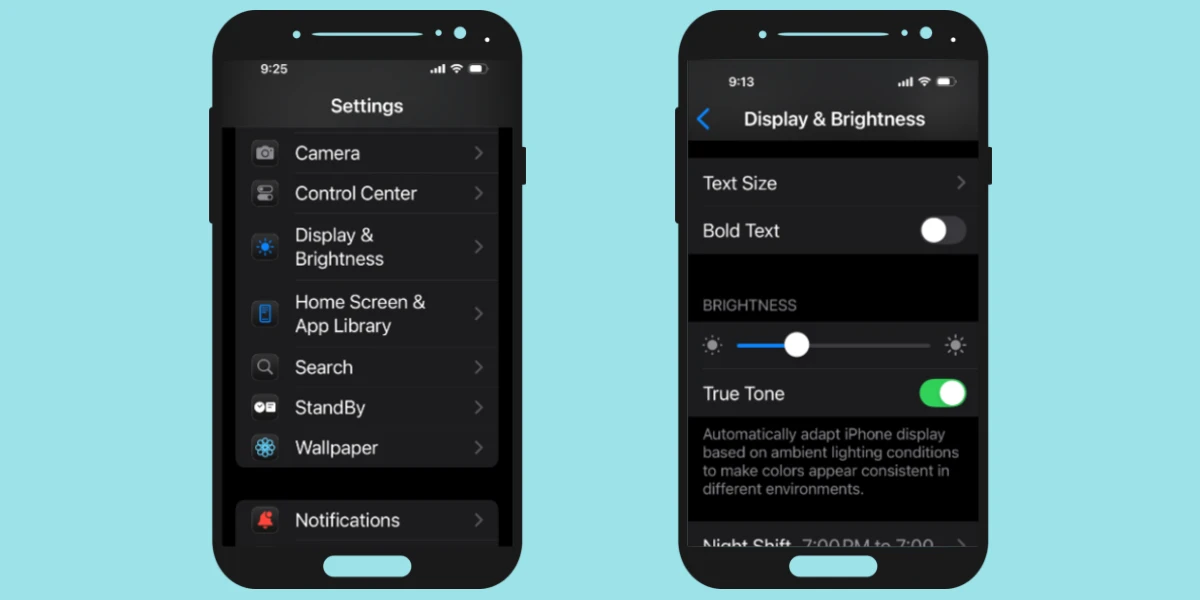
To make text bigger on an iPhone, open Settings, tap Display & Brightness, select Text Size, and move the slider to the right until the text is easier to read. You can also turn on Bold Text or use Accessibility settings for even larger text. Most seniors can make...